Translate

Friday, April 4, 2014

Very slow insertion of record in Oracle database.

Very slow insertion of record in Oracle database


Hi readers I am sharing this knowledge to all you to make you understand how to resolve issue related to very slow insertion of record in a database.

Platform:
OS: Windows Server 2003 32 bits.
Oracle Version: 10.2.0.1 Enterprise Edition.

Issue Observed:

Its an issue related to slow insertion of record and slow movement of messages in IBM MQ server from MQ local queue only connected to an oracle database server. As per observation found, that during morning insertion of messages are fine, but as the time passes and peak how started, the number of messages gets started increasing and movement of messages / insertion of record getting very slow.

One important think also observed that the table where the data gets inserted, in this table lots of DML operation related to (insertion and deletion) are going on in a high level.

Analysis for Issue:

1) Found fragmentation in table.

2) Checked Initran values for these tables and its indexes set to 1.
3) Observed one query that is used for fetching the records from these tables having Full table scan.
4) As per application team information it has been found that only 750 approx messages are being inserted
to table during peak hour when volume of messages goes beyond 50,000 in one hour, and there is a huge queue of messages started in local queue of MQ.

Solution.

1) Set the Initran value for these table to 50.
2) Create one index for the query.
     Please see the explain plan for the same query before and after index creation,and number of execution for the same query is too high.
Observation after Changes.

1) More that 120 queries Full table scan has been resolved by creating one index.
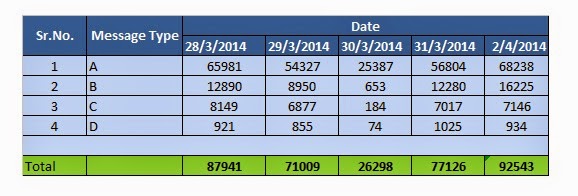
2) As per application team information now 12000 approx messages are being inserted in a hour.
3) And we have achieved to transferred more than 90000 message in a day without any issue.
4) Application now doses't observed any pile up or MQ messages queue or stack from local queue of MQ.

Statistics of record inserted to the table without any slowness or pile up in MQ local queue.

Conclusion:

Finally we found that in morning as there is very less number of record present in table, so query was fetcing the record without delay, now during peak hour number of count increases in table and also number of record to be inserted to table also increasing simultaneously. So that is the reason that after creating the index and after increasing the Iinitran value the issue gets resolved.

Tuesday, January 14, 2014

Oracle Data guard in Oracle Standard Edition license product.

An important documentation on Oracle data sync on Standard edition.

Oracle Data guard in Oracle Standard Edition license.
Prepared by: Tapas Kumar Karmakar & Suman Das.
Designation: Oracle DBA.
Base Version: Ora_SE_DG_V01.d
Applied to: Oracle Server - Standard Edition - Version 8.1.5.0 and later
Metalink ID: 333749.1

This document is prepared with the guidance taken from Oracle Metalink ID: 333749.1 and Suman Das (Oracle DBA @ Nelito Syatem) . As per this Metalink ID, when any organization took “Oracle license for Standard edition” for using Production with DR (Disaster Recovery) setup, No one can use the keyword “STANDBY” in DR setup, this keyword is subject to license violation.

So in order to overcome this license violation we can follow the following steps, for creating DR database with archive log apply from primary database.

Steps to be followed.
Note:  (Assuming DR setup is ready with same replica of datafile, redolog file as of primary set up)

        1)        Create a backup control file from Primary.
           SQL> alter database backup controlfile to '<name>.ctl';
        2)        Transfer the backup controlfile from DC to DR, and keep it in same location as it in pfile location on DR database.
        3)        Start the DR database.
a)        Create spfile from pfile=’……..’;
b)        Startup nomount
c)        Alter database mount;
        4)        Transfer the archive log created in DC to DR.
        5)        Apply the archive log to DR using command.
           SQL> recover database using backup controlfile until cancel;

              After all the set up has been done, some important note needs to be kept in mind.

        1)        Add tempfiles to temp tablespace.
This is because recovery using backup controlfile command automatically removed tempfile records from controlfile
            SQL> alter tablespace temp add tempfile '<name>' size..
This is because recovery using backup controlfile command automatically removed tempfile records from controlfile
        2)        If you create a new tablespace in primary you may get the following errors while applying the corresponding logs in DR server.
            ORA-00283: recovery session canceled due to errors
            ORA-01244: unnamed datafile(s) added to controlfile by media recovery
            ORA-01110: data file 7: 'D:\oradatd\DR\tes1.dbf'


         3)        At this stage you need to run a command like this to create an empty datafile in standby.
a)        SQL>select name from v$datafile where name like '%UNNAMED%';
Output will come with “UNNAMED00007” where 7 represent datafile number.
                b)     SQL> alter database create datafile 'D:\ app\oracle\OraHome1\UNNAMED00007'
                              as ' D:\oradatd\DR\test01.dbf'; Where “D:\oradatd\DR\” is location for datafiles in standby.
Now you can restart the recovery process.


If anybody wants to open the DR database for reporting purpose then steps to be followed.

1)     Stop recover of database if pending.
      Sql> Alter database recover cancel;
           Sql> Alter database open read only;
2)     Alter reporting purpose works gets completed.
           Sql> Shu immediate;
           Sql> Startup nomount;
           Transfer archive logs from DC to DR.
           Sql> recover database using backup controlfile until cancel;


Transfer the archive log files from DC to DR.
COMMAND

  xcopy F$\TEST\ARC \\DR_IP\F$\TEST\ARC  /E /D /C /Y
  OR
  robocopy F$\TEST\ARC \\DR_IP\F$\TEST\ARC  /MIR /MON:1 /R:2000 /LOG+:file_name.txt

For checking archive log applied.
Sql> select max(fhrba_Seq) from x$kcvfh;


Conclusion.

Tested in training environment, passed all the statement without any error.
Required Oracle SE 8.1.5.0 and Later, windows xcopy or robocopy utility of OS. So before configuring the DR setup in SE edition everybody must follow this in order to follow Oracle license policy for DR setup created with oracle standard edition.


Regards.
Tapas Kumar Karmakar.
Oracle DBA.

Sunday, December 29, 2013

SPM Fixing (SPM:- SQL PLAN MANAGEMENT).

1) Identify the problematic query.

In my example say.
afcd3rktapas1

It is taking lots of buffer gets when optimizer_features_enabled='11.2.0.3'

select sql_id,DISK_READS,BUFFER_GETS,executions from v$sql where sql_id='afcd3rktapas1';

SQL_ID DISK_READ BUFFER_GETS EXECUTIONS
------ --------- ----------- ----------
afcd3rktapas1 364958 67544379 0

Sqltext.
---------
UPDATE C SET T = (SELECT
NVL(SUM(C.G(NVL(E.T,0.00),G
.A,'INR','NR',:B4 )),0.00) FROM E,G,C A
WHERE G.A = E.A AND A.A = G.A AND
G.BA != '16050001' AND A.A =
C.A AND A.S = C.S AND
A.L = C.L AND A.L =
C.L AND A.S = G.S AND A.L
= :B2 AND A.L = :B1 AND A.SET_ID = :B3 AND
TO_DATE(E.E) <= TO_DATE(:B4 ) AND TO_DATE(E.END_E)>=
TO_DATE(:B4 ) AND (G.S = 'O' OR G.S='O')) WHERE
SET_ID = :B3 AND L = :B2 AND L = :B1

Take the bind variable of the query.

NAME                             POSITION DATATYPE_STRING VALUE_STRING
------------------------------ ---------- --------------- ------------------------------
:B4                                     1 DATE
:B2                                     2 VARCHAR2(32)    XXXXX
:B1                                     3 DATE            12/26/2013 00:00:00
:B3                                     4 VARCHAR2(32)    0190
:B4                                     5 DATE            12/24/2013 00:00:00
:B4                                     6 DATE            12/24/2013 00:00:00
:B3                                     7 VARCHAR2(32)    0190
:B2                                     8 VARCHAR2(32)    XXXXX
:B1                                     9 DATE            12/26/2013 00:00:00

2) Find the best possible plan for the same query,
   In my example I have change optimizer_features_enabled='10.2.0.4';

Sql> alter session set optimizer_features_enabled='10.2.0.4';

Sql> variable cnt number; /* it will execute the query without effecting the data of table,
                             and will create the plan by returning 0 row */

/* DECLARE THE DIND VARIABLE NOTE: CHANGE THE DATE FIELD TO VARCHAR */
variable B4 VARCHAR2(32)
variable B2 VARCHAR2(32)
variable B1 VARCHAR2(32)
variable B3 VARCHAR2(32)

/* EXECUTE THE VARIABLE */

exec :B1:='12/26/2013'
exec :B2:='2388'
exec :B3:='2388'
exec :B4:='12/26/2013'

Sql> UPDATE /*good_plan*/ C SET T = (SELECT
NVL(SUM(C.G(NVL(E.T,0.00),G
.A,'INR','NR',:B4 )),0.00) FROM E,G,C A
WHERE G.A = E.A AND A.A = G.A AND
G.BA != '16050001' AND A.A =
C.A AND A.S = C.S AND
A.L = C.L AND A.L =
C.L AND A.S = G.S AND A.L
= :B2 AND A.L = :B1 AND A.SET_ID = :B3 AND
TO_DATE(E.E) <= TO_DATE(:B4 ) AND TO_DATE(E.END_E)>=
TO_DATE(:B4 ) AND (G.S = 'O' OR G.S='O')) WHERE
SET_ID = :B3 AND L = :B2 AND L = :B1;

0 rows updated.

Sql> select sql_id,DISK_READS,BUFFER_GETS,executions,plan_hash_value from v$sql where sql_text like '%/*good_plan*/%';

SQL_ID DISK_READ BUFFER_GETS EXECUTIONS PLAN_HASH_VALUE
------ --------- ----------- ---------- ---------------
dcba3rxapyfs1 949 346 0 4567846893

++++++++++++++++++++++++++++++++++++++++++++++++++++++++++++++++++++++++++++++++++++++++++++++++++++++++++++++++++++++

Steps for fixing the plan.
--------------------------
1) variable cnt number;
exec :cnt:=dbms_spm.load_plans_from_cursor_cache(sql_id=>'&sql_id');
enter bad query ----> it will load the value of plan of bad query in SPM
afcd3rktapas1

2) select sql_handle, sql_text, plan_name, enabled from dba_sql_plan_baselines;

SQL_HANDLE                     SQL_TEXT PLAN_NAME                      ENA
------------------------------ ------------------------------------------------- ------------------------------ ---
SQL_ae48a49af377a3d6           UPDATE C SET T = (SELECTNVL(SUM(C.G(NVL(E.T,0.00) SQL_PLAN_awk54mbtrg8yqc03d1b54 YES

3) exec :cnt:=dbms_spm.alter_sql_plan_baseline( -
                sql_handle=>'&handle', -
                plan_name=>'&plan_name', -
                attribute_name=>'enabled', -
                attribute_value=>'NO');> > > >
Enter value for handle: SQL_ae48a49af377a3d6
Enter value for plan_name: SQL_PLAN_awk54mbtrg8yqc03d1b54

select sql_handle, sql_text, plan_name, enabled from dba_sql_plan_baselines;

SQL_HANDLE                     SQL_TEXT PLAN_NAME                      ENA
------------------------------ ------------------------------------------------- ------------------------------ ---
SQL_ae48a49af377a3d6           UPDATE C SET T = (SELECTNVL(SUM(C.G(NVL(E.T,0.00) SQL_PLAN_awk54mbtrg8yqc03d1b54 NO

4) exec :cnt:=dbms_spm.load_plans_from_cursor_cache(sql_id=>'&sql_id',plan_hash_value=>&plan_hash,sql_handle=>'&sql_handle');
Enter value for sql_id: dcba3rxapyfs1 /good/
Enter value for plan_hash: 4567846893 /good/
Enter value for sql_handle: SQL_ae48a49af377a3d6 /old/

select sql_handle, sql_text, plan_name, enabled from dba_sql_plan_baselines;

SQL_HANDLE                     SQL_TEXT PLAN_NAME                      ENA
------------------------------ ------------------------------------------------- ------------------------------ ---
SQL_ae48a49af377a3d6           UPDATE C SET T = (SELECTNVL(SUM(C.G(NVL(E.T,0.00) SQL_PLAN_ccd5w9pkt1u713969ca76 YES
SQL_ae48a49af377a3d6           UPDATE C SET T = (SELECTNVL(SUM(C.G(NVL(E.T,0.00) SQL_PLAN_awk54mbtrg8yqc03d1b54 NO


====================================================================================

Conclusion.
Now after doing this when you check the buffer gets for the same query after executing it,you will get a huge change.

Monday, September 9, 2013

Steps for Importing and Exporting statistics from one database to other database.

Steps for Importing and Exporting statistics from one database to other database.
=================================================================================

1) exec dbms_stats.create_stat_table(ownname=>'OWNER_NAME',stattab=>'MY_STAT_TABLE');

   example: exec dbms_stats.create_stat_table(ownname=>'SYS'stattab=>'MY_STAT');

2) exec dbms_stats.export_schema_stats(ownname=>'ENTER_THE_OWNER_NAME',
   stattab=>'ENTER_THE_TABLE_NAME_CREATED_ABOVE',statown=>'ENTER_OWNER_OF_MY_STAT_TABLE');

   example: dbms_stats.export_schema_stats(ownname=>'SCOTT',stattab=>'MY_STAT',STATOWN=>'SYS')

3) export the table created with statistics data contained. (as a .dmp file)

4) Transfer the data to another database where statistics is to be imported.

5) import the (.dmp file) to the datbase.

6) exec dbms_stats.import_schema_stats(ownname=>'Enter_the_own_name_statistics_gathered_schema',
   stattab=>'ENTER_THE_TABLE_NAME_CREATED_ABOVE',statown=>'Enter_the_owner_name_of_the_table_containing_data_of_statistics',force=>true);

   example: exec dbms_stats.import_schema_stats(ownname=>'SCOTT',stattab=>'MY_STAT',statown=>'SYS',force=>true);

Wednesday, September 4, 2013

Purging a SQL plan from shared pool. "Purging a Single cursor from shared pool"

This Document is applicable for Oracle 11g Release 2.
======================================

Identify the problemetic sql_id.

Find the Address and hash_value of the sql_id

In my example sql_id is 'arxk2v5bw36mp'

col OWNER format a10
col NAMESPACE format a10
col TYPE format a10

select d.OWNER,d.NAMESPACE,d.TYPE,d.SHARABLE_MEM,d.KEPT,d.FULL_HASH_VALUE,
s.sql_id,s.address,s.hash_value
from v$db_object_cache d,v$sqlarea s
where d.name=s.SQL_TEXT
and s.sql_id='&sql_id'

OWNER      NAMESPACE  TYPE       SHARABLE_MEM KEP FULL_HASH_VALUE                  SQL_ID        ADDRESS          HASH_VALUE
---------- ---------- ---------- ------------ --- -------------------------------- ------------- ---------------- ----------
           SQL AREA   CURSOR            12616 NO  7541aaf7b87e0b3babf642d957c19a75 arxk2v5bw36mp C0000006B0B15310 1472305781
           SQL AREA   CURSOR                0 NO  7541aaf7b87e0b3babf642d957c19a75 arxk2v5bw36mp C0000006B0B15310 1472305781
           SQL AREA   CURSOR             4720 NO  7541aaf7b87e0b3babf642d957c19a75 arxk2v5bw36mp C0000006B0B15310 1472305781


Flush the SQL olan form library cache.
========================================
exec dbms_shared_pool.purge('C0000006B0B15310,1472305781','C',65);

select d.OWNER,d.NAMESPACE,d.TYPE,d.SHARABLE_MEM,d.KEPT,d.FULL_HASH_VALUE,
s.sql_id,s.address,s.hash_value
from v$db_object_cache d,v$sqlarea s
where d.name=s.SQL_TEXT
and s.sql_id='&sql_id'

Output.

SQL> exec dbms_shared_pool.purge('C0000006B0B15310,1472305781','C',65);

PL/SQL procedure successfully completed.

SQL> /
Enter value for sql_id: arxk2v5bw36mp
old   5: and s.sql_id='&sql_id'
new   5: and s.sql_id='arxk2v5bw36mp'

no rows selected

Note: In above example 65 means the whole object from shared pool will be purged.
      i.e plan of query will be purged from library cache. And C means object "sql statement" that is not    a package/procedure/function/trigger/sequence.